History and restore
Every saved version of a data point, who changed it, and how to put an earlier value back.
Every time a data point's value is saved, the previous value is kept. The History panel on the data point toolbar shows that trail, newest first, with the live value pinned at the top.
What each entry tells you
An entry shows the content, when it was saved and who saved it. Badges explain how the change came about:
| Badge | Meaning |
|---|---|
| Current | The value in the report right now. |
| AI | Written by the assistant inside The Cards. |
| AI-generated | The content originated from AI and has not been edited since. |
| Edited after AI | Someone changed an AI-written value by hand. |
| Agent | Written through an MCP token by an external AI client. The entry names the person whose token was used. |
| Restored | This version came from a restore. |
| From previous report | The value arrived through a report copy or migration. |
| No change | Saved, but identical to the version after it. |
A version that carried additional information shows it under the content, and restoring that version brings the note back along with the value.
Together these are the audit trail. They are what makes it possible to answer "who wrote this number, and was a person involved" months later.
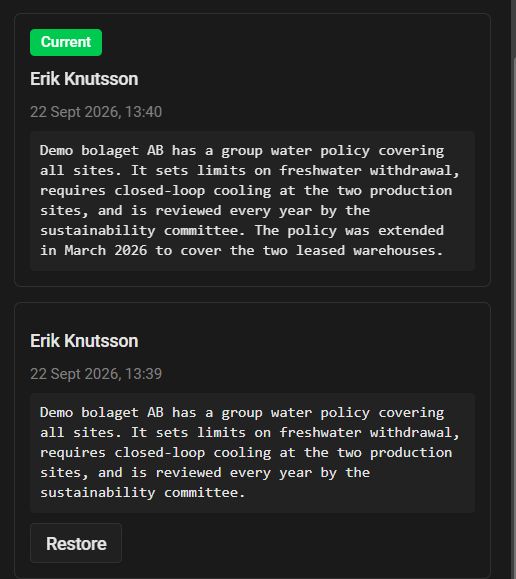
Restoring an earlier version
Choose Restore on any past version and confirm.
Restoring does not delete anything. It writes the old content as a new version at the top of the history, so the value you restored over is still there. The trail only ever grows.
Restore requires write access to the report and an Active report.
Values that came from another report
When a data point was filled by copying a report, the history shows a card above the timeline explaining where it came from: the source report, the source data point id, and the version mapping used if the standard changed.
If Keep changelog was selected during the copy, the source report's own history for that field is carried across too, and the timeline below continues into the previous year.

